How to Use an External Domain with lihi
If you would like to use an existing unused domain or a new domain purchased from another provider with lihi, follow the steps below to add it as an external domain. Be sure to point the domain’s IP address to the address assigned by lihi.
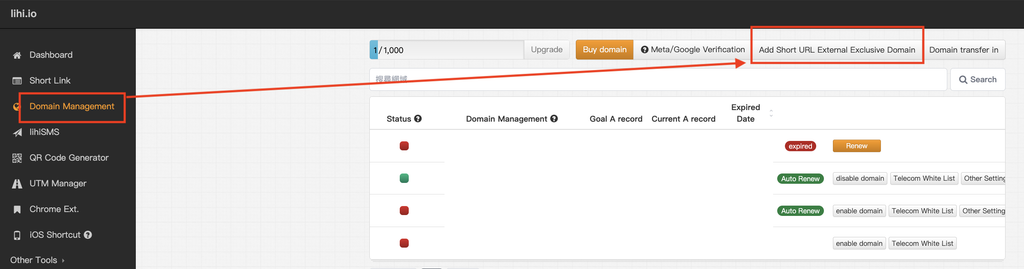
1.Log in to the lihi dashboard, select Domain Management, and click Add Short URL Exclusive Domain.
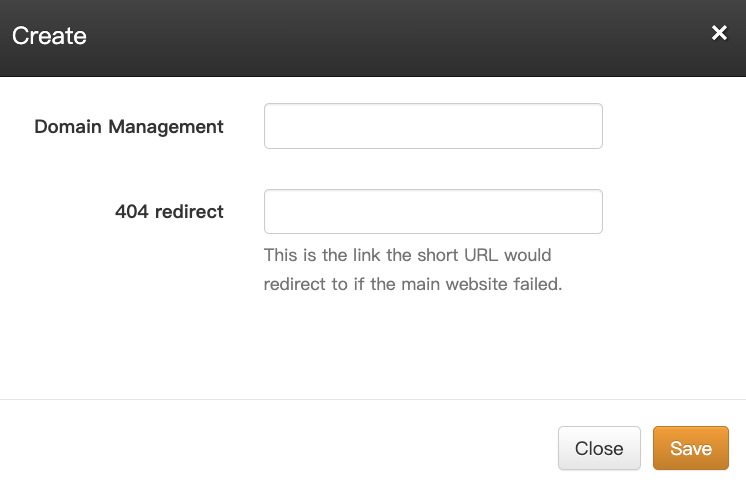
2.Enter your domain name and specify a custom 404 redirect URL. Save the settings to activate the domain. Once DNS propagation is complete, the domain will be ready to use.
Tip: The same setup process applies when adding a subdomain to a domain purchased through lihi.
Start using lihi for free ⇒ Click Here!
Start using lihi for free
Join thousands of marketers and optimize your links today.

No credit card required. Setup in 60 seconds.