Google Ads Negative Keyword List Template: How to Setup & Optimize for Better ROI
Stop wasting your budget on irrelevant traffic. Copy our curated Google Ads negative keyword list to improve your lihi campaign precision and ROI.
Stop Paying for Junk Clicks: The Ultimate Google Ads Negative Keyword List
You’ve built a great product, set up your short links with lihi, and launched your Google Ads. But then you see it: your budget is burning, and your dashboard is full of clicks that visitors who leaves in 0 seconds.
The problem isn’t your ad; it’s the junk traffic—low-quality clicks with zero intent to convert—that you’re paying for.
To help you scale faster, we’ve compiled a “Master Negative Keyword List.” Copy these into your account to ensure your link performance data only tracks high-quality, high-intent leads.

Understanding the Role of Your Tools
Before diving into the list, it’s crucial to understand how your tools work together to track success.
lihi is responsible for unified management of your short URLs, UTMs, and traffic distribution settings, ensuring every click is correctly tagged. Google Ads drives the traffic, and lihi ensures that inbound traffic is measurable and organized right from the first click.
Before You Begin: To get the most out of this template, you’ll need a robust list of terms to exclude. If you haven’t prepared yours yet, feel free to use our curated [100+ Essential Google Ads Negative Keyword Master List] to instantly block low-intent traffic and protect your budget.
Why a Shared List is Better for Your ROI
Don’t add keywords one by one. Use the Shared Library in Google Ads. This allows you to apply one master list to every campaign using lihi links, ensuring a consistent Google Ads negative keyword strategy across your entire marketing ecosystem.
The Master List: 100+ Keywords to Exclude Now
Copy and paste these categories into your Google Ads “Negative Keyword List.”
1. The “Free & Cheap” Seekers
If you are selling a premium solution, you don’t want people looking for handouts.
free, giveaway, cheap, discount code, torrent, cracked, hacked, open source, freeware, no cost, gratis.
2. Job Hunters & Students
These users are looking for a paycheck or a degree, not a product.
job, hiring, career, salary, internship, resume, cv, recruiter, employment, work at, university, school, training, course, class, student.
3. Research & Information Intent
Filter out people who are just “browsing” or writing a paper.
what is, definition, tutorial, research, book, pdf, white paper, example, template, diagram, history, statistics, journal, news.
4. Technical Support & Login
Exclude your own existing customers or people looking for help with competitors.
login, sign in, support, customer service, manual, setup, how to fix, warranty, refund, app store, google play.
5. Irrelevant Media & Adult Content
Protect your brand safety and avoid accidental clicks.
video, mp3, download, wallpaper, photo, images, movie, porn, adult, gambling, game.
How to Apply This List (Step-by-Step)
About negative keywords by Google
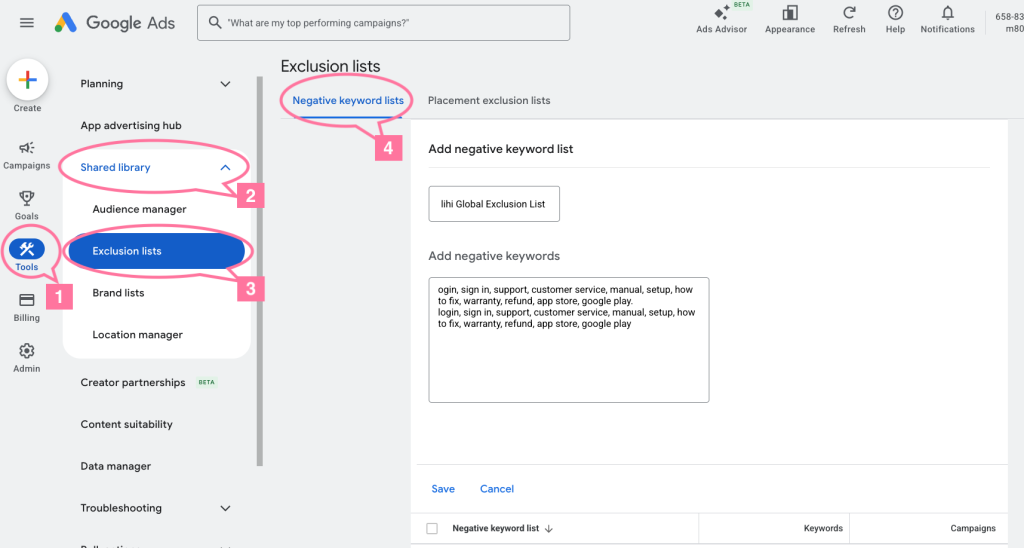
- Navigate to your Google Ads account.
- Click Tools & Settings (the wrench icon).
- Under Shared Library, select Negative keyword lists.
- Click the plus (+) button and name it “lihi Global Exclusion List.”
- Paste the keywords from the categories above.
- Apply to Campaigns: Select the campaigns you are currently tracking with lihi.
Pro Tip: Set your match types carefully. Using Phrase Match (e.g.,
"free") is usually the safest way to block “free download” while still allowing searches for your actual brand.Important Note: Google frequently updates its keyword matching logic. While the advice above is effective now, always refer to the latest official Google Ads documentation for match type definitions to avoid outdated practices.
Clearer Data, Better Decisions
When you exclude the junk, your click data becomes far more valuable. Instead of seeing 1,000 clicks with a 0.1% conversion rate, you might see 200 clicks with a 5% conversion rate in your link management dashboard.
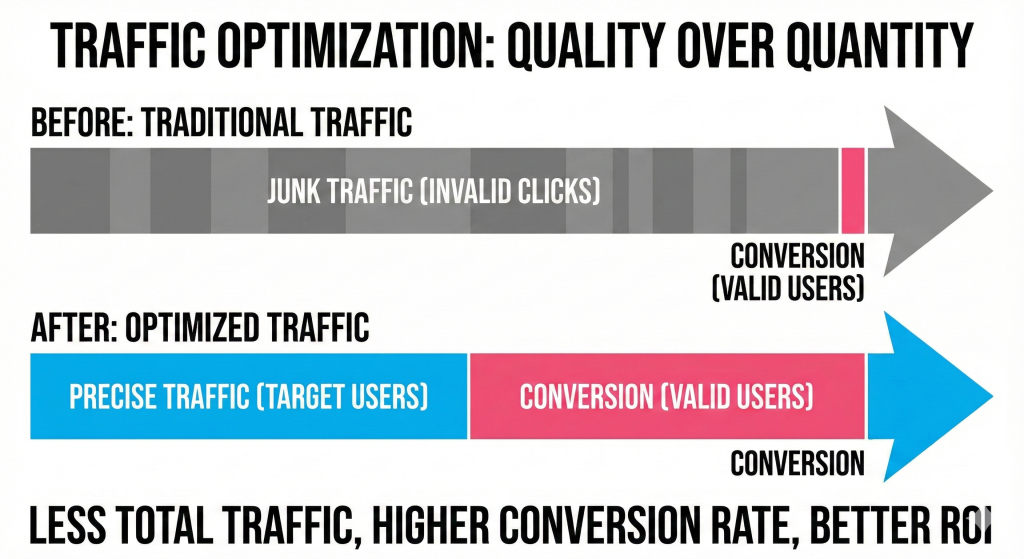
For more detailed behavioral analysis and conversion performance, it is still recommended to view data in the GA4 dashboard. lihi’s data is mainly used for quick interpretation at the entry and campaign levels.
Practical advice: Use your lihi dashboard to see ‘which link or creative asset performed well’, and use GA4 to see ‘the entire funnel and complete conversion path’.
This combined approach gives you the clarity needed for effective campaign optimization.
Start using lihi for free
Join thousands of marketers and optimize your links today.